
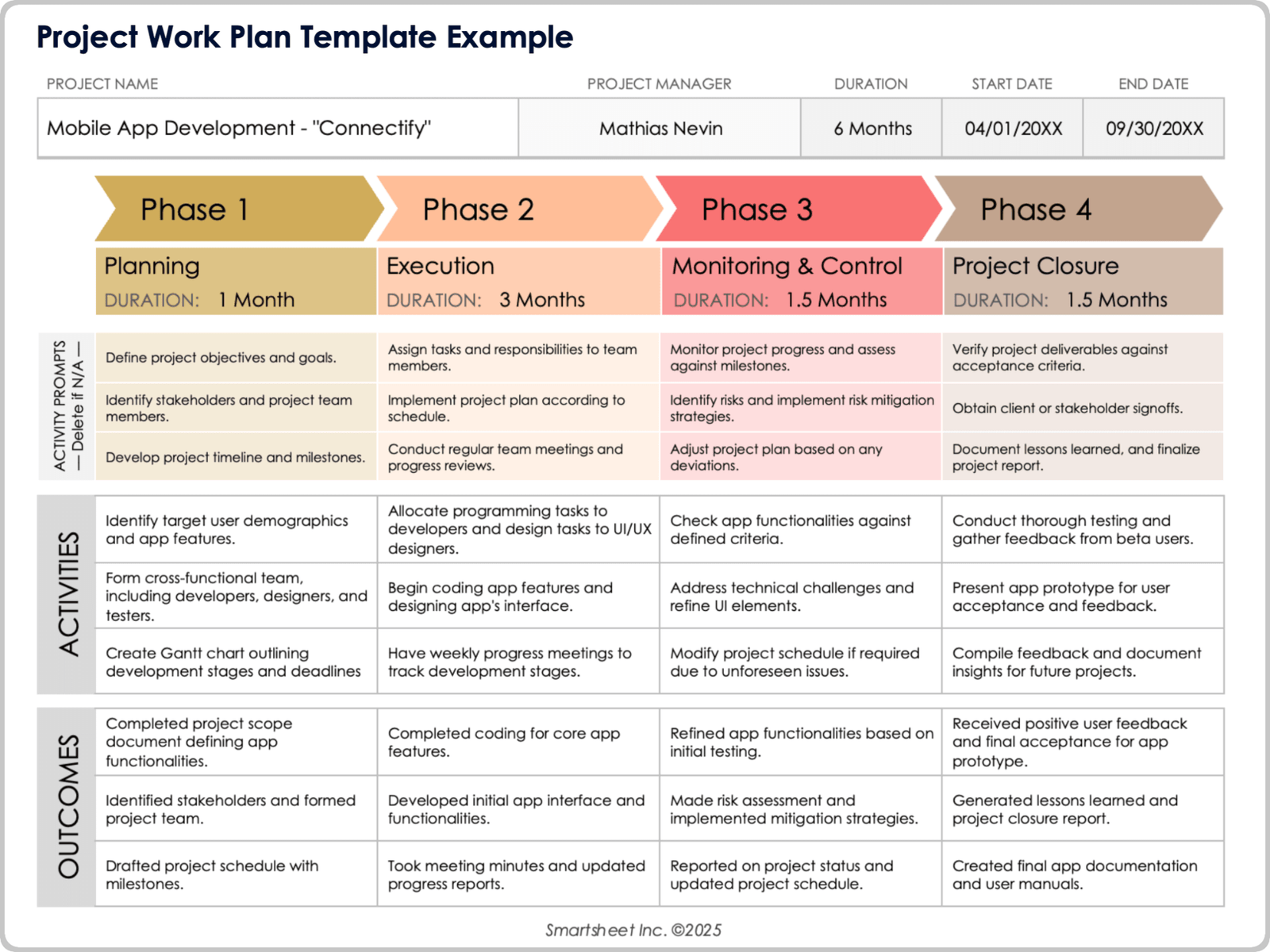
Every successful project starts with a plan, but building one from scratch every time is a waste of hours you don’t have. That’s where project planning templates come in. They give you a ready-made structure for scope, timelines, budgets, and responsibilities, so you can spend less time formatting spreadsheets and more time actually managing the work.
Whether you’re coordinating a small marketing campaign or overseeing a multi-phase construction build, the right template turns a blank page into a clear roadmap. In this guide, we’ll break down what project planning templates are, the different types available, how to choose one that fits your project, and practical tips for using them effectively.
What Are Project Planning Templates?
A project planning template is a pre-formatted document or digital tool that outlines the key components of a project, such as goals, tasks, deadlines, resources, and stakeholders. Instead of starting from zero, teams fill in the blanks with project-specific details.
Templates typically live in spreadsheets, project management software, or word processors, and they standardize how information is captured. This consistency matters: when every project follows the same format, it’s easier to compare progress across teams, spot risks early, and onboard new team members without a steep learning curve.
Why Use a Project Planning Template
Project planning templates aren’t just about saving time, though that’s a major benefit. They also improve the quality and consistency of your planning process.
Save Time and Reduce Errors
Building a plan from scratch invites inconsistency and missed details. A template ensures you cover every essential element, from milestones to risk assessments, without reinventing the wheel each time.
Improve Team Alignment
When everyone works from the same format, expectations become clearer. Team members know exactly where to find deadlines, deliverables, and their individual responsibilities.
Support Better Decision-Making
A well-structured template makes it easier to visualize dependencies and bottlenecks before they become problems. This upfront clarity helps project managers allocate resources more effectively.
Scale Across Projects
Once a template proves effective, it can be reused and adapted for future projects, creating a repeatable process that improves with each iteration.
Types of Project Planning Templates
Different projects call for different planning approaches. Here are the most common template types and when to use them.
Gantt Chart Templates
Gantt charts visualize tasks along a timeline, showing start dates, durations, and dependencies. They’re ideal for projects with sequential steps, like product launches or software development sprints, where understanding what needs to happen before the next task begins is critical.
Project Timeline Templates
Similar to Gantt charts but often simpler, timeline templates give a high-level view of major milestones. They work well for stakeholder presentations or when you need a quick snapshot of overall project progress.
Work Breakdown Structure (WBS) Templates
A WBS template breaks a project into smaller, manageable components. This hierarchical approach is especially useful for complex projects where large deliverables need to be divided into specific tasks and subtasks.
Project Budget Templates
Budget templates track estimated versus actual costs across categories like labor, materials, and overhead. They help project managers catch cost overruns early and maintain financial accountability throughout the project lifecycle.
Risk Management Templates
These templates identify potential risks, their likelihood, impact, and mitigation strategies. They’re essential for projects with regulatory requirements, tight deadlines, or significant financial stakes.
Project Charter Templates
A project charter template outlines the project’s purpose, objectives, scope, and key stakeholders. It’s typically used at the very start of a project to secure buy-in and set clear boundaries before detailed planning begins.
How to Choose the Right Template
With so many options, selecting the right template depends on a few key factors.
Consider Project Complexity
Simple projects with few dependencies may only need a basic timeline template, while complex, multi-phase projects benefit from a combination of a WBS, Gantt chart, and risk register.
Match the Template to Your Team’s Workflow
If your team already uses specific project management software, look for templates that integrate directly with that platform to avoid duplicate data entry.
Prioritize Flexibility
Choose templates that can be customized. Rigid templates that don’t accommodate your project’s unique needs often get abandoned halfway through.
Think About Stakeholder Needs
If you’re regularly presenting updates to executives or clients, prioritize templates with clean, visual layouts that communicate status at a glance.
Best Practices for Using Project Planning Templates
Having the right template is only half the battle. Here’s how to get the most value from it.
- Customize before you start. Adjust column headers, categories, and terminology to match your organization’s language and processes.
- Keep it updated. A template is only useful if it reflects current reality. Set a regular cadence, weekly or biweekly, to update statuses and deadlines.
- Assign clear ownership. Every task in the template should have a named owner, not just a department or team.
- Avoid overcomplicating it. Adding too many fields or categories can make a template harder to maintain. Stick to what your team will actually use consistently.
- Review and refine after each project. Use post-project reviews to identify what worked and adjust the template for next time.
Where to Find Project Planning Templates
Many project management tools, including spreadsheet software and dedicated platforms, offer built-in template libraries. These are a great starting point because they’re already formatted for common use cases like Gantt charts, budgets, and task trackers. From there, you can customize the structure to match your team’s specific workflow and reporting needs.
Final Thoughts
Project planning templates remove the guesswork from getting started and give teams a shared structure to work from. The key is choosing a template that matches your project’s complexity, keeping it updated throughout the project lifecycle, and refining it based on what you learn along the way. With the right template in place, planning becomes less about paperwork and more about setting your project up for success from day one.










Leave a Reply